Docs
From zero to objects on your VPS.
Install, operate, and integrate Johnny with the CLI, panel, and REST API.
Overview
Johnny wraps Garage with production-ready automation: TLS via Caddy, nightly
SFTP backups with retention, a johnny CLI, and an optional Laravel web panel
with two-factor authentication.
Orchestration runs only on your primary VPS (push model). Backup servers
only need SSH/SFTP and disk space.
Requirements
- Ubuntu 24.04 LTS on the primary VPS
- DNS
A/AAAA pointing your hostname at the server before
install (Let's Encrypt)
- For each backup target: SSH/SFTP reachable from the primary, with write access under
the remote path
Installation
Prefer the autoinstaller. It installs dependencies, starts Garage (v2.4.1 by default, override with
GARAGE_VERSION), creates the
default bucket and keys, configures Caddy TLS, writes
/etc/johnny/backup.json, installs nightly cron, and can optionally install the panel.
sudo mkdir -p /opt && sudo git clone https://github.com/andreapollastri/johnny /opt/johnny
cd /opt/johnny
sudo bash scripts/autoinstall.sh
Manual install
sudo bash scripts/install.sh
sudo systemctl start johnny-garage
sudo bash scripts/bootstrap-single-node.sh
Then configure TLS yourself — see config/caddy-johnny.caddy.example or
config/nginx-johnny-s3.conf.example.
Web panel
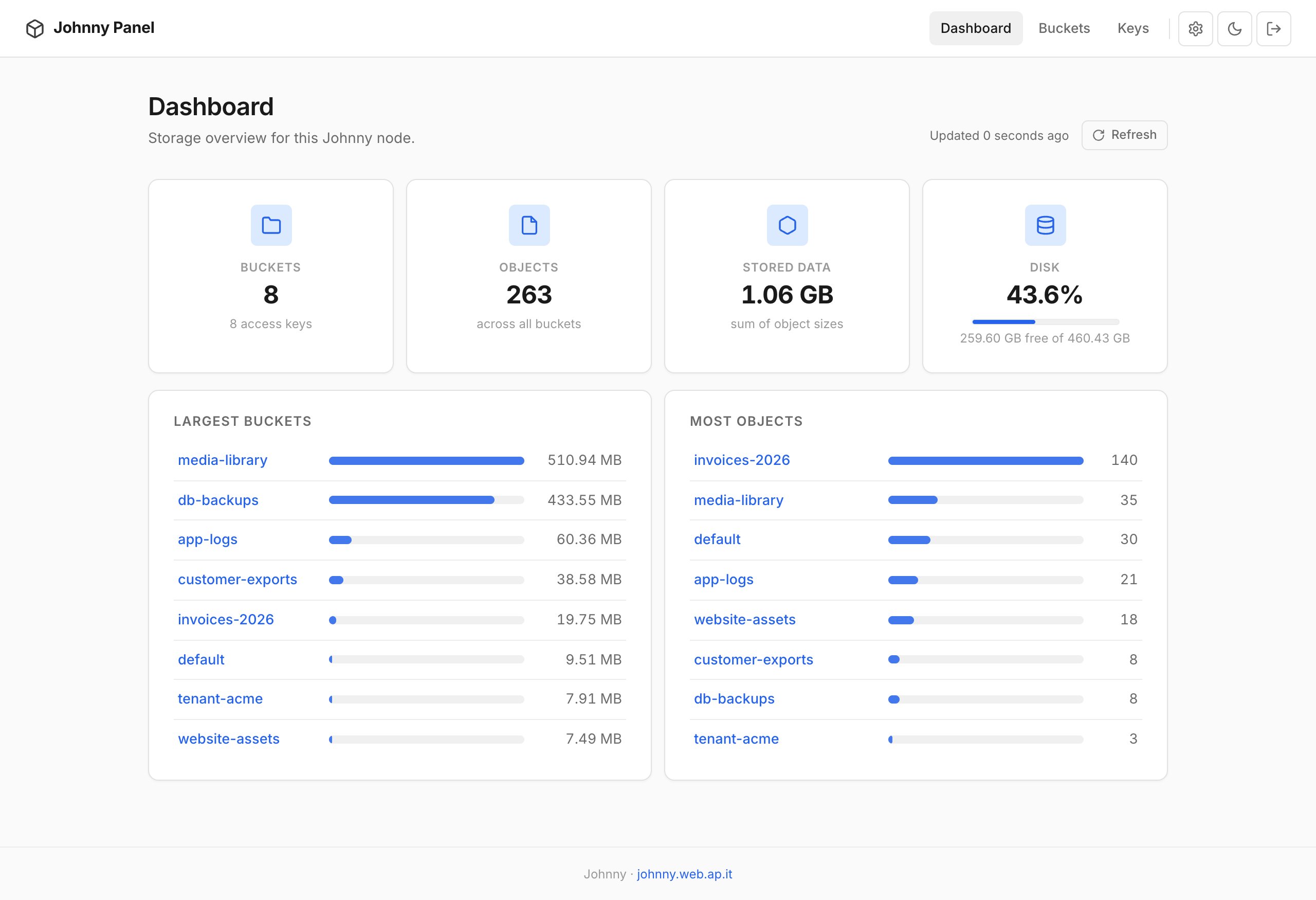
Optional Laravel panel: a storage dashboard, a file browser (folders, multi-file upload,
downloads, pagination), access keys with one-time credentials, per-bucket read / write /
owner permissions, TOTP two-factor authentication and API tokens. If you skipped it during
autoinstall:
sudo bash scripts/install-panel.sh /opt/johnny https://panel.example.com
Create an admin
sudo -u www-data php /opt/johnny/panel/artisan johnny:admin you@example.com 'strong-password'
Open the panel hostname, sign in, then enable TOTP 2FA under Settings.
SMTP for password reset
Default MAIL_MAILER=log only writes to the Laravel log. Set SMTP in
panel/.env, then rebuild the config cache:
sudo -u www-data php /opt/johnny/panel/artisan config:cache
Local demo
Try the panel or work on it without a server. demo/up.sh starts a real single-node
Garage cluster, seeds eight buckets with about 1 GB of sample objects, keys and permissions,
provisions a tenant through the REST API, and serves the panel on
http://127.0.0.1:8099 (demo@johnny.test / johnny-demo).
Everything lives in demo/.state/.
brew install garage
bash demo/up.sh
# later: bash demo/down.sh --wipe
The screenshots on this page come from that demo and are regenerated with
node demo/screenshots.mjs. Requirements: Garage 2.x, PHP 8.5, Composer and curl.
CLI
| Command |
Description |
johnny version |
Print installed version |
johnny status |
Garage cluster status |
johnny update check|apply [--force]|status |
Check, install or report updates |
johnny update channel stable|beta |
Follow release tags or the head of main |
johnny update auto|system-auto on|off |
Nightly Johnny / server updates |
johnny update system |
Update every package of the server |
johnny update ensure |
Re-run the install steps of the installed build |
johnny bucket list|create |
List or create buckets |
johnny key list|create |
List or create API keys |
johnny backup list|create|delete|run |
Manage SFTP backup targets |
johnny backup set-retention N |
Keep dated folders for N days (default 90) |
Prefer sudo -u johnny johnny … for key and bucket mutations that write Garage state.
Backups
Nightly job (03:00) uses rclone to sync every bucket to one or more SFTP targets under
a dated folder layout. Retention deletes YYYY-MM-DD folders older than
retention_days.
johnny-backups/
  2026-04-03/
    default/
    my-bucket/
  2026-04-04/
    default/
    my-bucket/
Config: /etc/johnny/backup.json (mode 600). Logs:
/var/log/johnny-nightly.log.
S3-to-S3 replication
cp config/replication/media-to-eu.env.example config/replication/media-to-eu.env
# edit credentials, then:
sudo bash scripts/replicate-run.sh config/replication/media-to-eu.env
Panel API
Secured with Laravel Sanctum personal access tokens. Interactive docs at
/api/docs, OpenAPI at /api/openapi.yaml.
sudo -u www-data php /opt/johnny/panel/artisan johnny:api-token you@example.com --name=provisioning
Provision bucket + key
curl -sS -X POST \
  "https://panel.example.com/api/buckets/provision" \
  -H "Authorization: Bearer YOUR_TOKEN" \
  -H "Accept: application/json" \
  -H "Content-Type: application/json" \
  -d '{"bucket":"customer-orders"}'
| Method |
Path |
Description |
| GET |
/api/buckets |
List buckets |
| POST |
/api/buckets |
Create a bucket |
| GET |
/api/buckets/{bucket} |
Metadata & keys |
| DEL |
/api/buckets/{bucket} |
Delete empty bucket |
| GET / POST / DEL |
/api/keys |
List, create, lookup, delete keys |
| POST / DEL |
/api/buckets/{b}/keys… |
Grant or revoke key access |
| POST |
/api/buckets/provision |
Bucket + key + credentials in one call |
Laravel disk
Compatible with Laravel's S3 filesystem driver. Install the Flysystem adapter, paste
credentials into .env, and store files.
composer require league/flysystem-aws-s3-v3 "^3.0" --with-all-dependencies
FILESYSTEM_DISK=s3
AWS_ACCESS_KEY_ID=GK....123
AWS_SECRET_ACCESS_KEY=012...XYZ
AWS_DEFAULT_REGION=johnny
AWS_BUCKET=my-bucket
AWS_ENDPOINT=https://s3.my-domain.com
AWS_USE_PATH_STYLE_ENDPOINT=true
Storage::disk('s3')->put('avatars/photo.jpg', $contents);
The provisioning API returns the same keys in an env map for automated tenant onboarding.
Updates
Johnny updates itself in place, in the git checkout named by /etc/johnny/repo.path:
every night, from the panel's Updates page, or by hand.
# check, then install
sudo johnny update check
sudo johnny update apply
- stable (default) installs the newest release tag (
X.Y.Z; vX.Y.Z and X.Y are read too);
beta follows the head of main (sudo johnny update channel beta).
A build is installed only when it contains the installed commit: never backwards.
- Each update backs up the panel database (SQLite, MySQL/MariaDB, PostgreSQL) to
/var/backups/johnny,
checks the build out, runs its install steps (scripts, Composer, migrations, caches) and a health check;
a failure puts the previous commit and the database back. apply --force reinstalls the newest build.
- Server update (
sudo johnny update system): apt-get full-upgrade keeping your config files,
Composer and rclone when not installed from apt, a restart of PHP-FPM or Caddy only when their packages changed,
and the health check. It never reboots unless SYSTEM_REBOOT=1, and then only at night.
- Nightly: server packages at 02:00 (
johnny update system --auto), Johnny at 02:30
(johnny update apply --auto), backup at 03:00. Switches (UPDATE_CHANNEL, AUTO_UPDATE,
SYSTEM_UPDATE, SYSTEM_REBOOT) live in /etc/johnny/update.env;
sudo johnny update auto off and system-auto off turn the nightly runs off.
- The panel's Updates page (arrow icon in the header) does the same: check, update, force, channel, nightly switches,
the server update and a reboot notice, with the log followed live. Every panel user is an administrator and can use it;
it runs only the exact
johnny update … lines allowed in /etc/sudoers.d/johnny-panel.
From 1.1.x there is nothing to do: the old nightly johnny update --pull pulls main one last time,
and migration 008 moves the server to this schedule, writes update.env (stable, nightly Johnny and
server updates on) and adds the update lines to the panel's sudoers file. To move over at once:
sudo johnny update --pull.
Log: /var/log/johnny-update.log.
Security
- Restrict
/etc/johnny (especially backup.json and credentials/) —
defaults are already 600/700
- Prefer SSH keys on backup servers; password auth is documented for simplicity
- Firewall: expose 443 (and 80 for ACME); restrict 22
to trusted IPs
rclone sync can delete extras under each dated prefix — review the rclone sync docs- Every panel user is an administrator and can start updates; the panel may run as root only the exact
johnny update … lines in /etc/sudoers.d/johnny-panel
Configuration
| Path |
Purpose |
/etc/johnny/garage.toml |
Garage configuration |
/etc/johnny/backup.json |
Backup targets and retention |
/etc/johnny/credentials/default-s3.env |
App S3 credentials |
/etc/johnny/credentials/backup-internal-s3.env |
Internal backup S3 credentials |
/etc/johnny/repo.path |
Path to the Johnny repo |
/etc/johnny/update.env |
Update channel and nightly switches |
/etc/cron.d/johnny-nightly |
Server update 02:00, Johnny 02:30, backup 03:00 |
/etc/sudoers.d/johnny-panel |
What the panel may run: Garage CLI as johnny, update commands as root |
/var/lib/johnny-update/state.json |
Last check and last runs, read by the panel |
/var/backups/johnny/ |
Panel database backups taken before each update (newest 5) |
/var/log/johnny-update.log |
Update log (Johnny and server) |
panel/.env |
Laravel panel environment (see below) |
Panel environment
| Variable |
Purpose |
GARAGE_ACCESS_KEY_ID / GARAGE_SECRET_ACCESS_KEY |
Panel S3 key (johnny-default), written by the installer |
GARAGE_ENDPOINT / GARAGE_DEFAULT_REGION |
Public S3 URL and region returned to API clients |
GARAGE_DATA_DIR |
Filesystem shown in the dashboard disk gauge (default /var/lib/johnny/data) |
JOHNNY_CLI_BINARY / JOHNNY_CLI_SUDO_USER |
How the panel calls the CLI (default sudo -n -u johnny /usr/local/bin/johnny) |
JOHNNY_UPDATE_STATE / JOHNNY_UPDATE_SUDO |
Updater state read by the Updates page (default /var/lib/johnny-update/state.json);
run johnny update … through sudo -n (default true) |
APP_TIMEZONE |
Timezone for dates in the panel (default UTC) |
Source and issues:
github.com/andreapollastri/johnny
· MIT License · v1.2.1